
NSFW AI Image Prompts: Templates for Anime-Z and Photorealistic
A good NSFW AI image prompt is a layered visual plan, not a pile of keywords. You name one clear subject, then add the framing, a single pose, the setting, the light and the style, with the most important details first. This guide gives you that formula and eight copy-ready templates for the two styles in Nextpart AI's NSFW AI image generator, Anime-Z and Photorealistic, plus how to choose an aspect ratio and refine an image without wasting credits.
What Makes a Good NSFW AI Image Prompt?
A good NSFW AI image prompt describes one specific subject, then adds composition, one pose or action, a setting, lighting and a style, in that order of importance. Specific visual details beat adjectives like "hot" or "beautiful," and putting the subject first keeps the generator from inventing the parts you care about most.
Build every prompt from six layers:
- A clear subject. Age range, build, hair, face and expression ("a woman in her mid-20s, curvy, long auburn waves, green eyes, soft smile"). Specific details make better images, and a stated age keeps the look consistent from one generation to the next.
- Composition and camera. Portrait, medium shot, full-body or close-up, and the angle (eye level, from above, over the shoulder).
- One pose or action. Seated on a bed edge, leaning against a doorframe, looking back over a shoulder. Pick one.
- Setting. A specific place: a hotel room at night, a rooftop at dusk, a moonlit forest.
- Lighting and color. The light source and its direction (warm bedside lamp, cool window light from the left, neon through blinds) and the overall palette.
- Style and texture. For Photorealistic: lens, depth of field, film grain, skin and fabric texture. For Anime-Z: line art, cel shading, color intensity.
Here's the difference in practice. A vague prompt:
sexy naked woman on a bed
The same idea as a layered prompt:
Photorealistic medium shot of a woman in her mid-20s with wavy blonde hair and freckled shoulders, wearing only a sheer white lace bodysuit, kneeling on rumpled linen sheets with her back arched, soft morning light through sheer curtains, gentle shadows across bare skin, 50mm lens, shallow depth of field.
The second version settles age, look, outfit, pose, place, light and mood instead of leaving them to chance.
Photorealistic NSFW AI Image Prompt Templates
Photorealistic prompts work best when they read like a photographer's shot list. Describe the camera (lens, depth of field), where the light comes from, and the texture of skin and fabric.
Useful camera language for this style:
- Lens: 85mm for flattering portraits, 50mm for natural medium shots, 35mm for full-body shots with more of the room.
- Depth of field: "shallow depth of field" blurs the background and pulls focus to the subject.
- Light direction: "window light from the left" or "rim light from behind" tells the generator how to shape the body and face.
- Texture: "natural skin texture," "water droplets on bare skin," "satin sheen," "soft film grain" add realism.
Template 1: Mirror boudoir
Photorealistic portrait of a woman in her mid-20s, shoulder-length auburn hair, green eyes, hourglass figure, topless, wearing only black thigh-high stockings, a garter belt and lace panties, standing in front of a full-length mirror in a hotel suite, one hand in her hair, the reflection showing her bare back, warm bedside lamp as the only light, 85mm lens, shallow depth of field, soft film grain.
Best for: classic boudoir shots with lingerie and a mirror. Suggested ratio: 3:4.
Template 2: Steamy shower
Photorealistic full-body shot of a woman in her late 20s, athletic build, long legs, wet dark hair slicked back, fully nude in a glass walk-in shower, back to the camera and glancing over her shoulder, water running down her bare skin, steam on the glass, cool morning light from a side window, 35mm lens, natural skin texture, water droplets in sharp focus.
Best for: full-body nudes with wet-skin texture. Suggested ratio: 9:16.
Template 3: Open silk robe
Photorealistic medium shot of a voluptuous woman in her mid-20s, full curves, long chestnut waves, confident gaze at the camera, nude beneath an open white silk robe sliding off her shoulders, seated in a deep velvet armchair with her legs crossed, golden-hour sun through tall windows, warm skin tones, 50mm lens, editorial boudoir style.
Best for: curvy subjects and sensual partial nudity. Suggested ratio: 4:3.
Template 4: Neon sheets
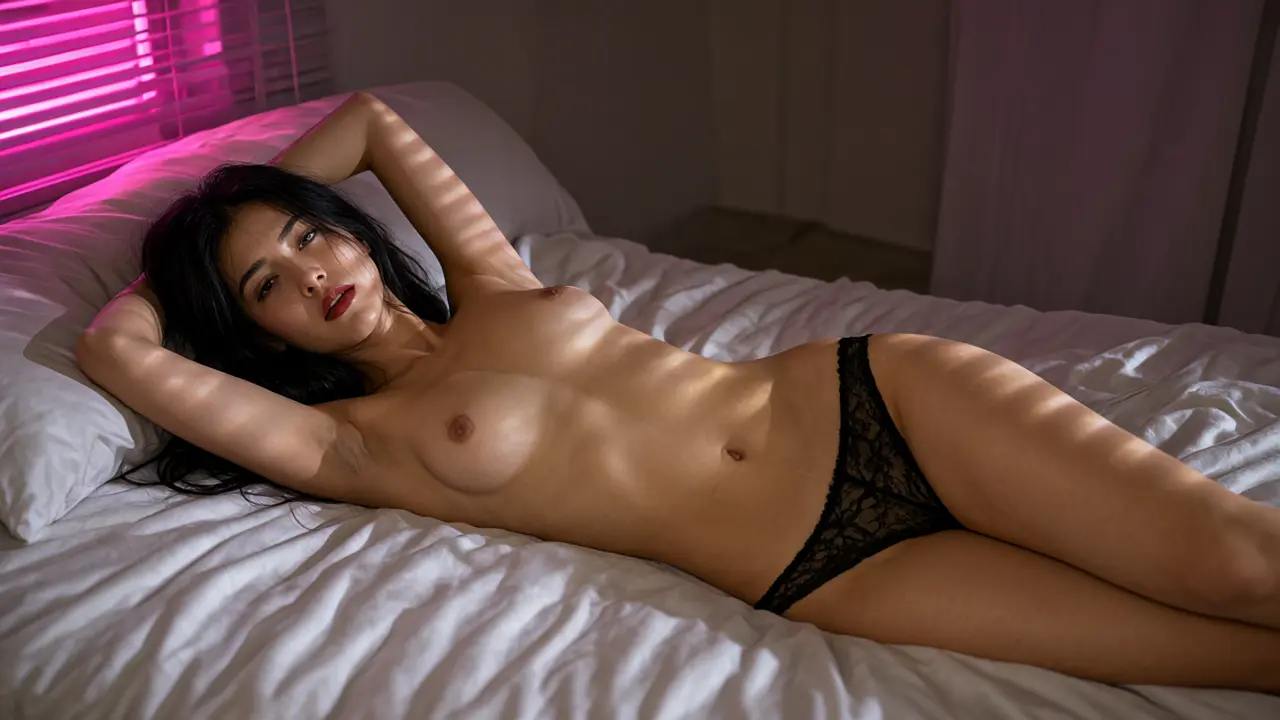
Photorealistic wide shot of a woman in her early 20s with long black hair and red lipstick, slim toned build, topless in black lace panties, stretched out across silk sheets with her arms above her head, neon pink light through window blinds casting stripes across her bare skin, high contrast, cinematic color grade, 35mm lens.
Best for: moody, high-contrast erotic lighting. Suggested ratio: 16:9.
Anime-Z NSFW AI Image Prompt Templates
Anime-Z prompts should describe the art itself: line art, shading, color intensity and eye detail, alongside the subject and scene. Stating an age range like "mid-20s" or "late 20s" helps the model draw a defined, grown-up face, since anime styles can read younger when no age is given.
Useful art language for this style:
- Line and shading: "clean line art," "crisp line art," "soft cel shading."
- Color: "vivid colors," "muted pastel palette," "warm lantern glow," "glossy skin highlights."
- Detail: "detailed eyes," "flowing hair," "soft bokeh background."
- Body and face: an age range, "curvy," "toned," "long legs," "defined cheekbones."
Template 5: After-hours office
Anime-style illustration of a woman in her late 20s, long silver hair, defined cheekbones, golden eyes, sultry half-lidded smile, white blouse unbuttoned and slipping off her shoulders to reveal a black lace bra, black stockings and garters, sitting on the edge of an office desk with one leg raised, city lights through the window at night, clean line art, soft cel shading.
Best for: modern anime pin-ups with lingerie. Suggested ratio: 3:4.
Template 6: Elf sorceress
Anime-style full-body art of a tall elf sorceress in her late 20s, voluptuous figure, long legs, long platinum hair, nearly nude except for delicate gold body chains and a sheer translucent veil, reclining on white furs on a moonlit temple altar, glowing runes in the air, cool blue rim light on her bare skin, detailed eyes, vivid colors.
Best for: fantasy nudes with a dramatic setting. Suggested ratio: 9:16.
Template 7: Rain-soaked rooftop
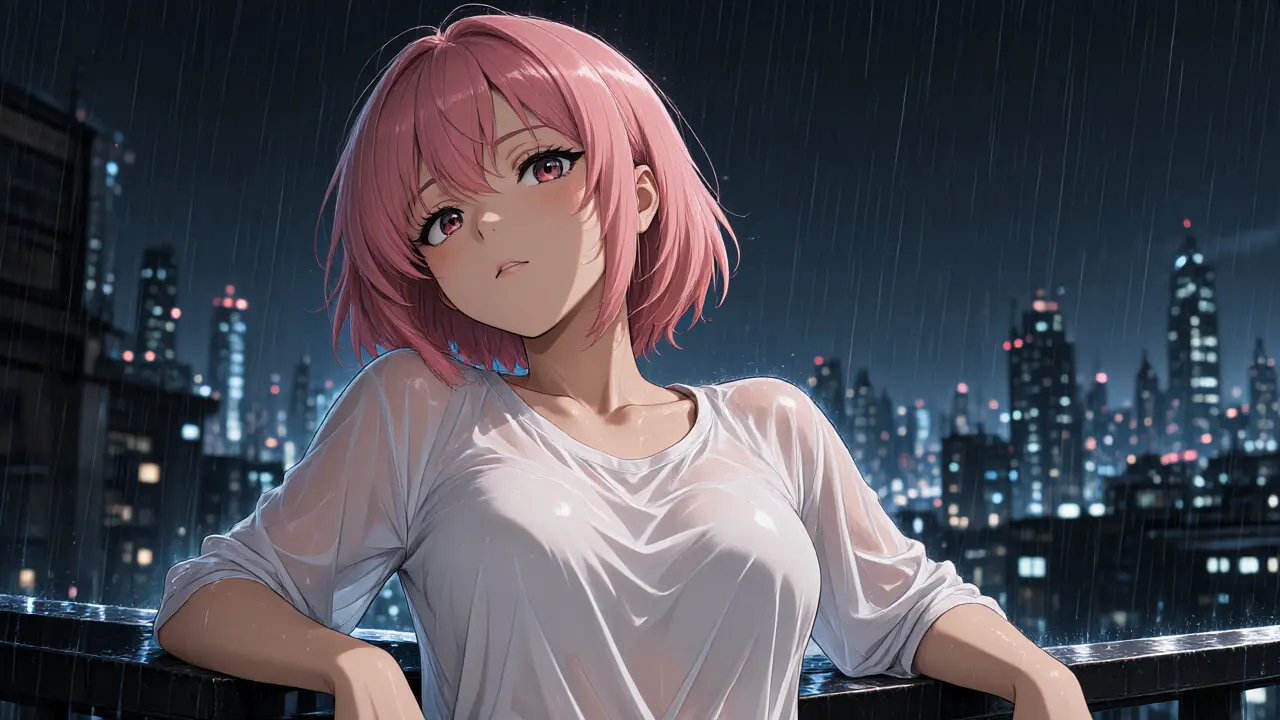
Anime-style scene of a woman in her mid-20s, short pink hair, toned athletic figure, wearing a soaked white shirt that clings to her body and turns see-through with nothing underneath, leaning back against a rooftop railing in heavy rain at night, neon city skyline behind her, wet glossy highlights on her skin, soft bokeh, sensual mood.
Best for: wet-look, see-through outfits and cyberpunk-style backdrops. Suggested ratio: 16:9.
Template 8: Hot spring
Anime-style illustration of a curvy woman in her late 20s, wide hips, long dark hair in a loose bun, nude and kneeling in an outdoor hot spring, steam partly veiling her body, looking back over her shoulder with a teasing smile, red autumn leaves and paper lanterns around the pool, warm lantern glow, crisp line art, soft watercolor shading.
Best for: curvy anime characters and soft, steamy scenes. Suggested ratio: 1:1.
To try any of these, log in and paste a template into Nextpart AI's Create NSFW AI Images page. New accounts get free credits to start.
Which Aspect Ratio Should You Use for NSFW AI Images?
Use 3:4 or 9:16 for portraits and phone screens, 16:9 or 4:3 for scenes and widescreen images, and 1:1 for avatars and square posts. Nextpart AI's image generator offers all five, and the ratio you pick should match the framing words in your prompt.
- 1:1: avatars, profile images and square posts. Pair with "portrait" or "head and shoulders."
- 3:4: classic portraits and medium shots. Pair with "portrait" or "medium shot."
- 9:16: full-body shots and phone wallpapers. Pair with "full-body" or "standing."
- 4:3: scenes with some room around the subject. Pair with "medium shot" plus a described setting.
- 16:9: wide scenes, couples and landscapes. Pair with "wide shot" or a strong background.
A mismatch costs you an image: a "full-body shot" in 16:9 tends to leave the subject small.
How Long Should an NSFW AI Image Prompt Be?
An NSFW AI image prompt should be as long as it needs to be to remove ambiguity, and no longer. Nextpart AI allows up to 2,000 characters per prompt, but the most important details belong in the first sentence.
How to use that space well:
- Front-load the subject. Age, look and framing go first. Style and texture go last.
- One subject, one moment. If you want two different scenes, write two prompts and generate twice.
- Use the extra room for specifics. Fabric, light direction and background objects are worth the characters; vague praise is not.
How Do You Refine NSFW AI Images Without Wasting Credits?
On Nextpart AI, each generation makes one image and costs 30 credits, so the cheapest way to improve a result is to change one thing at a time. Compare the two styles first, since switching style keeps your prompt and aspect ratio unchanged, then adjust single details and reuse the settings that work.
A credit-friendly workflow:
- Write the full prompt and pick the ratio before your first generation.
- Generate once in each style. Switch between Anime-Z and Photorealistic; your prompt and ratio stay as they are, so the comparison is fair.
- Change one variable per round. Adjust only the lighting, or only the pose, or only the outfit.
- Check Image details in the results panel to see the prompt behind an image.
- Use Reuse settings to bring a good result's settings back into the editor, then make your single change.
- Download keepers from the results panel. Completed images are also saved to your album, and you can browse your creations in the My works tab.
What Are the Most Common NSFW AI Prompt Mistakes?
The most common NSFW AI prompt mistakes are vague subjects, conflicting actions, style words buried at the end, a character description that changes between prompts, and a missing age range. Each has a simple fix: be specific, choose one action, lead with style, reuse one description, and state an age range.
- Too vague. "Hot woman, sexy" leaves almost everything to chance. Fix: describe hair, eyes, build, outfit, pose, place and light.
- Competing actions. "Dancing, lying down and looking back" gives the generator three poses to blend. Fix: pick one pose per image.
- Style buried at the end. In a long prompt, a style note in the last line can get lost. Fix: open with the style ("Photorealistic portrait of…" or "Anime-style illustration of…").
- Inconsistent identity. Changing "auburn" to "red," "hourglass" to "slim" or "mid-20s" to "20s" between prompts changes the character. Fix: keep one fixed description and paste it unchanged.
- No age range. Without one, especially in anime styles, faces drift between generations. Fix: add "mid-20s" or "late 20s" so the model draws a consistent, defined face.
How Do You Turn a Generated Image Into a Video?
Nextpart AI's image generator has a "Use in AI Video" button in the results panel. It lets you take a finished image into Nextpart AI's video tools, so the still you just refined becomes the starting point for a clip instead of a new prompt from scratch.
Open a finished image, choose Use in AI Video, and continue in the AI video generator. The prompt habits from this guide carry over: be specific, describe one action, and name the light and mood.
If you'd rather see images come out of a story, Nextpart AI also generates scene backgrounds inside your chats, drawn from the current conversation instead of a written prompt. They appear as you roleplay in an NSFW AI chat with a character.
A Quick Note on Characters and Content
Nextpart AI's image generator is for adults 18 and over, and every character you create should be an adult. Don't use real people's names or likenesses. Invent your own characters and give them their own look, which also makes them easier to keep consistent across images and chats. Beyond that, the prompts are yours, so experiment with styles, outfits and settings freely.
FAQ
What's the difference between Anime-Z and Photorealistic prompts?
Photorealistic prompts work best with camera and lighting language, while Anime-Z prompts work best with line art, shading and color terms. You can test the same prompt in both, because switching style on Nextpart AI keeps your prompt and aspect ratio unchanged.
Why do my AI images look different every time?
Usually because the character description changes between prompts. Keep one fixed description of age, hair, eyes and build, paste it unchanged into every prompt, and use Reuse settings to bring back the setup of a result you liked.
How many credits does one image cost on Nextpart AI?
Each generation makes one image and costs 30 credits. You need to log in to generate, and new accounts get free credits; see credits and plans for more.
Where are my generated images saved?
Completed images are saved to your album, and you can browse your creations in the My works tab of Nextpart AI's image generator. You can also download any image from the results panel.