
How to Write AI Porn Video Prompts That Animate Your AI Images
The best AI porn video prompts don't describe what a character looks like. They describe how she moves. On Nextpart AI, you type your prompt in Advanced creation, where the video references a character photo you pick from your album. Her face, body and outfit are already set, so the prompt only has to cover the motion: one main action, one camera move, a pace, a little secondary movement and one line telling the model to keep the look. Below: the workflow, a five-part formula, eight copy-ready NSFW AI video prompts, camera moves and fixes.
How Do AI Porn Video Prompts Work?
AI porn video prompts work by splitting the job in two: the character photo sets the look and the prompt sets the motion. The video references the photo you chose, so the prompt should describe movement, camera and pacing. Re-describing her hair, body or outfit gives the model a second version to chase, and that is when faces and clothes start to drift.
Think of the photo as the cast, wardrobe and set, all locked in. The prompt is the direction you give once the camera rolls. That's why a strong image prompt and a strong video prompt look so different: one is a dense description of a single moment, the other a short, ordered set of directions.
How Do You Make an AI Porn Video With Advanced Creation on Nextpart AI?
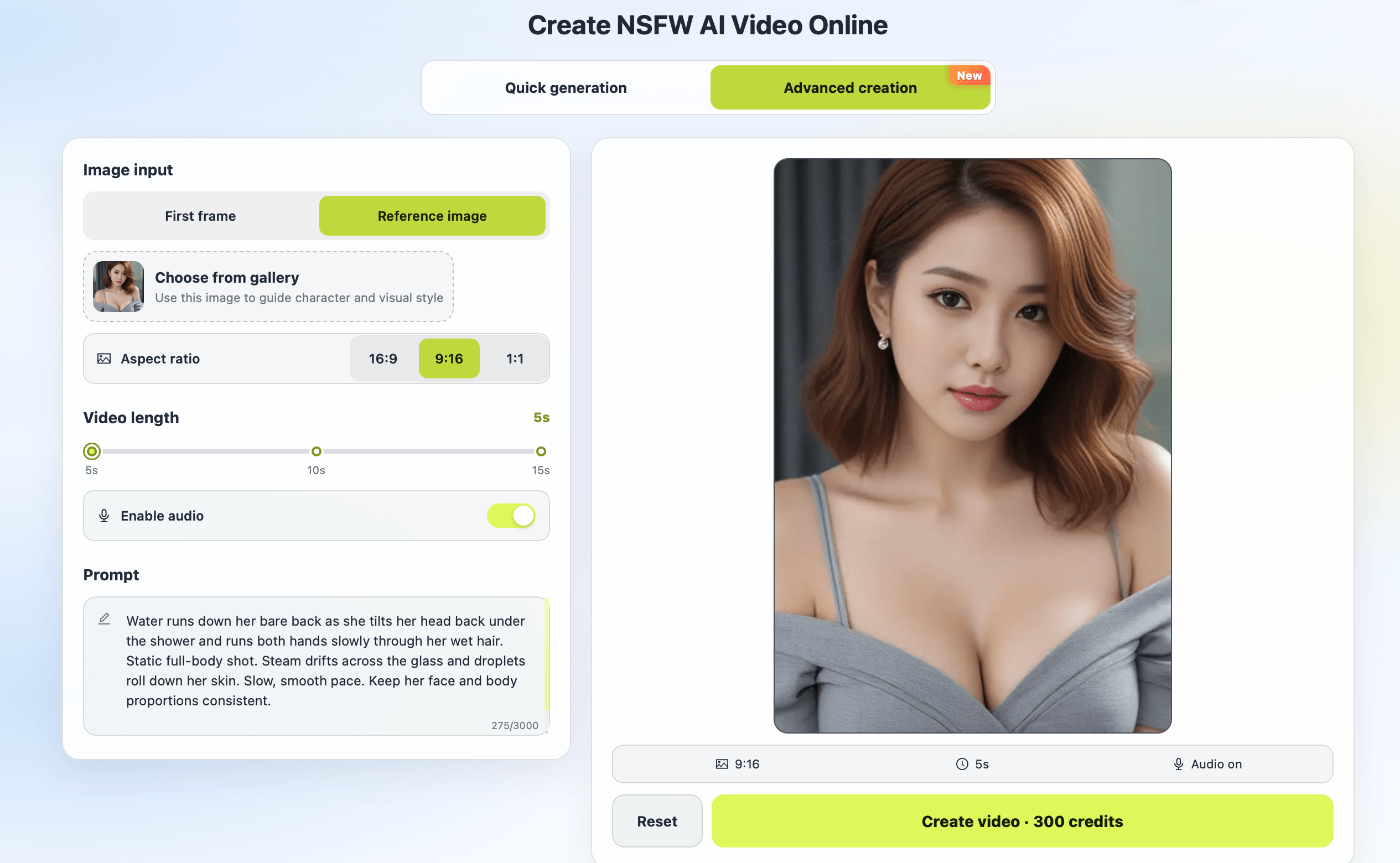
To make an AI porn video from a prompt on Nextpart AI, open Advanced creation, pick a character photo from your album, choose a 16:9, 9:16 or 1:1 aspect ratio, type your motion prompt and generate. The video references the character in that photo, so her look carries over. Clips run 5 to 15 seconds, and audio is supported.
Step by step:
- Get a character photo into your album. Images you create on Nextpart AI's Create NSFW AI Images page are saved to your album. If you need help with the still, start with our NSFW AI image prompts guide.
- Open Advanced creation. It's the prompt-based mode in Nextpart AI's AI porn video generator.
- Pick the photo and the frame. Choose the character photo from your album, then 16:9, 9:16 or 1:1, and a clip length from 5 to 15 seconds.
- Write the motion prompt and generate. Use the formula below. Describe movement, not appearance. If the clip isn't right, change one thing and try again.
Advanced creation uses 300 credits per 5 seconds of video and needs a Deluxe subscription. New accounts get credits on first login and can try Advanced creation once with a 5-second clip.
Nextpart AI's other two video modes don't need a prompt at all. Scene Video builds a clip straight from your NSFW AI chat conversation, and Quick generation animates a preset action you pick. This guide is about the mode where your words do the directing.
What Makes a Good Album Photo for Advanced Creation?
A good album photo for Advanced creation has one clear subject, a pose with room to move, a simple background and a shape that suits your chosen ratio. Pick 9:16 for vertical, phone-style clips, 16:9 for wide, cinematic scenes and 1:1 for close, square portraits. A full-body standing shot will feel cramped in a wide frame.
What to look for before you pick a photo:
- A clear face and body. Sharp features animate better than blurry or half-hidden ones.
- Room to move. For a stretch, turn or walk, leave space around her in the frame.
- A simple background. Busy scenes give the model more that can warp. Soft bokeh or a dim room hold up best.
- A matching shape. A full-body pose suits 9:16, a reclining pose suits 16:9 and a head-and-shoulders portrait suits 1:1. If you're generating a new still, use the same ratio there.
- Built-in movement. Loose hair, silk, steam or rain give the model natural secondary motion.
What Is the Best Formula for NSFW AI Video Prompts?
The most reliable formula for NSFW AI video prompts has five parts, written in order: one main motion, one camera move, the pace, a touch of secondary motion and one hold-the-look line. Keep it to a few short sentences. Each sentence gives the model one clear job, and the actions follow in the order you want them to play.
- Main motion. One dominant action, written in sequence: "She slowly turns her head toward the camera, then smiles."
- Camera move. One camera behavior: "Static shot," "slow push-in," "gentle orbit from left to right."
- Pace. "Slow, sensual pace," "unhurried," "languid." Short clips look best slow.
- Secondary motion. One or two small movements: hair shifting, fabric sliding, a slow breath, flickering candlelight.
- Hold-the-look line. "Keep her face, body and outfit unchanged." For anime characters, add "keep line art and colors consistent."
Match the action to the length. A 5-second clip fits one action. At 10 to 15 seconds you can add a second beat with "then," such as a turn followed by a smile.
A vague prompt:
make her sexy and moving
The same idea with the formula:
She slowly slides one strap of her lace bra off her shoulder and looks up at the camera with a soft smile. Slow push-in to a close-up. Her hair shifts as she breathes in. Slow, sensual pace. Keep her face and body unchanged.
AI Porn Video Prompt Templates You Can Copy
These eight templates follow the five-part formula. Each lists the album photo it suits and a ratio, so you can pair a character photo with its motion.
Template 1: Over-the-shoulder turn
She slowly turns her head and looks back over her bare shoulder at the camera, lips parting into a soft smile. Static medium shot. Her auburn hair slides across her back and her chest rises with a slow breath. Slow, sensual pace. Keep her face, body and lingerie unchanged.
Best for: boudoir portraits and mirror shots. Album photo: a woman in her mid-20s in stockings and lace, back to the camera, in 9:16 or 1:1.
Template 2: Silk robe slip
She lifts one hand and lets the open white silk robe slide off her shoulders and down her arms, baring her chest, then leans back into the armchair. Slow push-in from a medium shot to a close-up. Golden window light shifts gently across her skin. Unhurried pace. Keep her face and the room unchanged.
Best for: slow reveals with partial nudity. Album photo: a curvy woman in her mid-20s seated in an open robe, in 16:9.
Template 3: Shower rinse
Water runs down her bare back as she tilts her head back under the shower and runs both hands slowly through her wet hair. Static full-body shot. Steam drifts across the glass and droplets roll down her skin. Slow, smooth pace. Keep her face and body proportions consistent.
Best for: full-body nudes with water and steam. Album photo: a woman in her late 20s in a glass shower, in 9:16.
Template 4: Neon stretch
She arches her back and stretches slowly across the silk sheets, arms above her head, then turns her face toward the camera and exhales. Gentle sideways tracking shot from left to right. Neon stripes slide over her bare skin as she moves. Languid pace. Keep her face and the lighting unchanged.
Best for: wide, moody bedroom scenes. Album photo: a topless woman in her early 20s reclining on sheets, in 16:9.
Template 5: Stockings walk
She walks slowly toward the camera in black stockings and a sheer lace bodysuit, hips swaying, one hand trailing along the wall, and stops close to the lens with a teasing look. The camera pulls back slowly to keep her framed. Her hair bounces lightly with each step. Smooth, slow pace. Keep her face and outfit unchanged.
Best for: full-body lingerie clips with a strong walk. A longer clip gives the walk room. Album photo: a long-legged woman in her late 20s standing in a hallway, in 9:16.
Template 6: Anime blouse reveal
Anime style. She undoes the last button of her white blouse, lets it fall open off her shoulders to show her black lace bra, then crosses her legs on the edge of the desk and gives a half-lidded smile. Static shot. Her silver hair sways slightly and city lights twinkle in the window. Slow pace. Keep her face, line art and colors consistent.
Best for: modern anime pin-ups. Album photo: an anime woman in her late 20s in an open blouse and stockings in an office at night, in 9:16 or 1:1.
Template 7: Elf sorceress rises
Anime style. She rises slowly from the white furs as the sheer veil slips from her hips, gold body chains swinging gently with each movement, then looks down at the camera. Slow upward tilt from her legs to her face. Glowing runes drift and pulse in the air. Graceful, slow pace. Keep her face, platinum hair and line art consistent.
Best for: fantasy nudes with magical light. Album photo: a tall elf sorceress in her late 20s reclining on an altar, in 9:16.
Template 8: Rooftop kiss in the rain
The two of them lean in for a slow, deep kiss in the rain, his hands sliding down her soaked, see-through white shirt to her waist as she pulls him closer. Gentle orbit around them from left to right. Rain falls in streaks and neon reflections ripple across the wet rooftop. Unhurried pace. Keep both faces unchanged.
Best for: one couple scene with a cinematic backdrop. Album photo: a woman in her mid-20s and a man in his late 20s on a rainy rooftop at night, in 16:9.
Which Camera Moves Work Best in Short AI Porn Video Clips?
The camera moves that work best in short AI porn video clips are a static shot, a slow push-in, a slow pull-back, a gentle orbit and a slow tilt. Use exactly one per prompt. A short clip doesn't have time for a sequence of moves, and stacking them is one of the fastest ways to get shaky, warped results.
- Static shot: the safest choice. All the motion comes from her, so the face holds up best.
- Slow push-in: builds intimacy as it moves toward her. Good for reveals.
- Slow pull-back: shows more of the body or the room as she moves. Good for walks.
- Gentle orbit: circles the subject. Best with a simple pose and clean background.
- Slow tilt: travels up or down the body, from legs to face or the other way. Good for full-body 9:16 photos.
Avoid fast zooms, whip pans and spins.
How Do You Fix Common Image-to-Video Problems?
Most image-to-video problems come from asking for too much at once. If her face drifts, remove the appearance words and add a hold-the-look line. If the motion is chaotic, keep one action and one camera move. If the result is stiff, add one secondary motion. Then change only one variable per attempt.
- Her face changes. You probably re-described her look. Fix: delete hair, eye and body descriptions from the prompt and add "keep her face unchanged."
- The motion is chaotic. Too many actions or camera moves. Fix: one main action, written in order, plus one camera move.
- The clip looks stiff. Nothing small is moving. Fix: add one secondary motion, such as hair in a breeze, fabric sliding or a slow breath.
- The body warps mid-move. The action is too big or too fast for the frame. Fix: slow the pace, shrink the action, or pick a photo with more room around her.
- The framing feels wrong. The photo's shape fights the ratio. Fix: pick 9:16, 16:9 or 1:1 to match the pose.
- You can't tell what helped. Fix: test at 5 seconds and change one variable per attempt: action, camera, pace or secondary motion.
A Quick Note on Characters and Content
Nextpart AI is for adults 18 and over, and every character you animate should be an adult. Don't use real people's names, photos or likenesses. Build your own characters in the image generator instead, which also gives you cleaner album photos and more consistent faces. Beyond that, the motion is yours to direct, so experiment with actions, camera moves and pacing.
FAQ
What is an image-to-video prompt?
An image-to-video prompt is a short set of directions that tells an AI video model how a character in a picture should move. It covers the action, the camera move and the pace. On Nextpart AI, the character photo you pick already sets her look.
Should I describe the character again in my AI porn video prompt?
Usually not. Re-describing her face, body or outfit can make the model drift away from your photo. Describe only the motion, then add one line such as "keep her face and outfit unchanged."
Which Nextpart AI video mode uses a prompt?
Advanced creation is the one that takes a typed prompt. You pick a character photo from your album, choose 16:9, 9:16 or 1:1, set a length of 5 to 15 seconds and type the motion. Scene Video and Quick generation work without a prompt.
How long should an NSFW AI video prompt be?
A few short sentences is usually enough: the main action, the camera move, then short phrases for pace, secondary motion and the hold-the-look line. Longer prompts tend to add competing actions, not better motion.
Do I need a subscription for Advanced creation?
Yes. Advanced creation needs a Deluxe subscription and uses 300 credits per 5 seconds of video. New accounts can try one 5-second clip first; check the Deluxe plan details when you're ready for more.